Achieve insanely fast response times with minimal refactors and free Cloudflare services.
Processing a request will always be slow…
No matter how much you optimize the code. No matter how much you tune your database queries. The reality is that the longest part of the request lifecycle is waiting on the response from your Laravel app.
Being a web developer for over 25 years, I knew if I wanted to make my Laravel app fast, I should focus on page caching.
Most requests can be cached…
Most of your requests are for static resources - things that don't change. The CSS, JavaScript, and images. But most pages are static too, or can be with a little work.
Unfortunately caching has become a lost skill. We've focused on horizontal or serverless infrastructure. We forgot about making our pages performant.
Cloudflare can help…
I knew about Cloudflare. It had been on my list to look into their services. But they offer so many. It felt intimidating. So I kept putting it off.
When I finally did research caching pages for a Laravel app with Cloudflare, nothing worked. Well, one worked - but it was doing it all wrong. So I went deep.
I'll show you how…
I took laravelshift.com from 6% to 99% cached. Now all of my public-facing pages respond in under 40ms. And it runs on a childlike web server.
So, I went back and reviewed the changes I made for laravelshift.com. I organized them into this 5 lesson video course, where we'll:
By the end of the course, you'll have everything you need to improve the response times for your Laravel app. All using free services from Cloudflare.
A short, tactical video course
The Fast Laravel video course contains 30 videos, organized in 5 lessons. Each demoing code and tooling that will make your Laravel app respond faster.
Intro to caching
We'll levelset our understanding of the request lifecycle, HTTP cache headers, and the Cloudflare dashboard. We'll end by enabling caching.
A review of the HTTP request lifecycle and where caching fits.
Understand the different metrics for measuring page speed.
Review HTTP cache header and how its directives effect caching.
Learn how to invalidate (or bust) the cache.
Sign up for Cloudflare and onboard your domain.
Learn your way around Cloudflare's dashboard.
Get started by enabling caching with Cloudflare.
Asset caching
We'll get a quick win by optimizing and caching our front-end assets. The CSS, JavaScript, and images which rarely change. We'll end by bumping our percent cached.
Identify content types which may be cached immediately.
Learn how to optimize assets for faster responses.
Configure your web server to cache assets.
Configure Cloudflare to cache assets.
Implement cache busting strategies for your assets.
Identify and optimize other slow-loading assets.
Page caching
We'll avoid any footguns by configuring our Laravel apps for caching pages. We'll end ready to cache more pages.
Cache full HTML page responses.
Create middleware to set the cache headers.
Register a new middleware group for caching pages.
Understand how Laravel's default behavior effects caching.
Determine which pages you may cache.
Explore alternatives to session state for easier caching.
Basic strategies
We'll perform simple refactors to make even more pages without our Laravel apps cacheable. We'll end by with a high percent cached.
Use query parameters to differentiate response versions.
Leverage Cloudflare rules to modify requests and responses for caching.
Use cookies to handle dynamic content on a cached page.
Use JavaScript to handle dynamic content on a cached page.
Load dynamic content from a cached page.
Implement Cloudflare Turnstile to allow caching forms.
Advanced strategies
We'll go even farther with more strategies to cache complex pages and continue to reduce response times. We'll end by eeking out a few more percent cached.
More cache directives to cache partially dynamic content.
Set an identifier to differentiate cached responses.
Continue caching with a reverse proxy cache.
Use the Cloudflare API to purge and manage cache programmatically.
Reduce traffic by blocking invalid requests with Cloudflare.
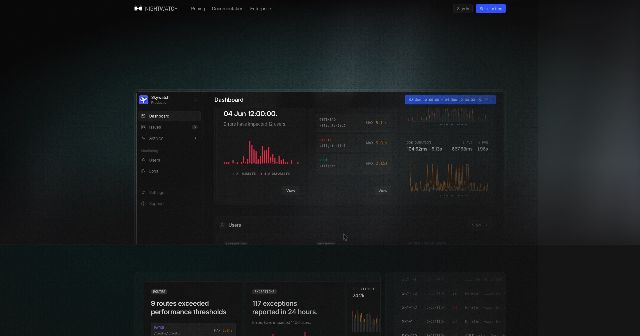
Learn what else to make faster with Nightwatch.

One price. Get everything.
No pricing gimmicks. There's just one price for Fast Laravel. You pay it. You have it all.
I worked with a small group of early access customers to make sure all of the content in the book was exactly what they needed. Here's what they had to say about the finished product.
JMac has taken a deep-dive into leveraging Cloudflare services to make a Laravel app respond insanely fast.
The community has learned a lot from JMac’s Cloudflare and performance articles on Laravel News. Fast Laravel is the most comprehensive version of that expertise yet.
You gotta be Cloudflare'd up!
Fast Laravel is all the stuff I wanted to know about caching in Cloudflare but was too lazy to learn by myself.
I thought I knew everything about caching but I was already learning new tricks in the second video!
I've respected JMac's experience and teaching for years. There's no doubt in my mind that Fast Laravel will be of exceptional quality.
I started caching pages with Cloudflare, but JMac took it to a level I didn't know existed. That's what he does - he optimizes.
If you have anything else you want to ask, please reach out.
The percentage mentioned on this page is the percent cached. This metric is provided by Cloudflare, and is also called bandwidth saved. It is the percentage of total bandwidth that is cached. The primary goal of the Fast Laravel video course is to increase your percent cached.
It depends. The videos in Fast Laravel use Cloudflare services. But other platforms offer these services. So if you use another platform, like AWS, you may perform the exact same refactors to your Laravel app, but translate the Cloudflare services to your platform equivalent.
No. All of the Cloudflare services used in the Fast Laravel video course are free. While some services do have restrictions or limitations, they will be noted in the video. You will need to have a Cloudflare account and a domain registered with Cloudflare. Again, you may sign up for Cloudflare for free. Fast Laravel contains a video for onboarding your domain with Cloudflare.
Not really. Since Cloudflare is a standalone service, your Laravel app, its architecture or infrastructure don't really matter. Even your Laravel version doesn't really matter. But, of course, having an up-to-date Laravel app is recommended.
Fast Laravel applies all of its strategies to a real-world Laravel app. Only 1 video in theoretical. Everything else should apply to any Laravel app, regardless of its underlying architecture or stack.
Yes. You may send payment to [email protected]. However, since payment is made outside this site, your account is not created automatically. It will be created manually once payment is finalized. You may email support to follow up.